AI-assisted PLC learning
How Relay, the AI tutor in Rungs Studio, teaches PLC by reading your code, speaking your language, and showing you the design choice instead of defending one answer.
Relay is the AI tutor built into Rungs Studio — the chat panel on the right side of the editor. It looks like every other AI chatbot, but every turn it sees your actual rungs and tag definitions. When you ask "is it correct?", it isn't guessing — it's reading the code you just wrote.
It sees your code
Studio's compiler catches the double coil — two rungs both ending with OTE(contactor), where the lower rung silently overrides the upper one on every scan. The warning that lands in the status panel is accurate but terse: Duplicate destructive bit reference: 'CONTACTOR'. If you're a first-week student, "destructive bit reference" is jargon you don't have yet.
Ask Relay what the warning means and it translates the diagnostic into vocabulary you have — naming the duplicated tag, explaining scan order in plain language, and suggesting how to combine the two rungs into one:
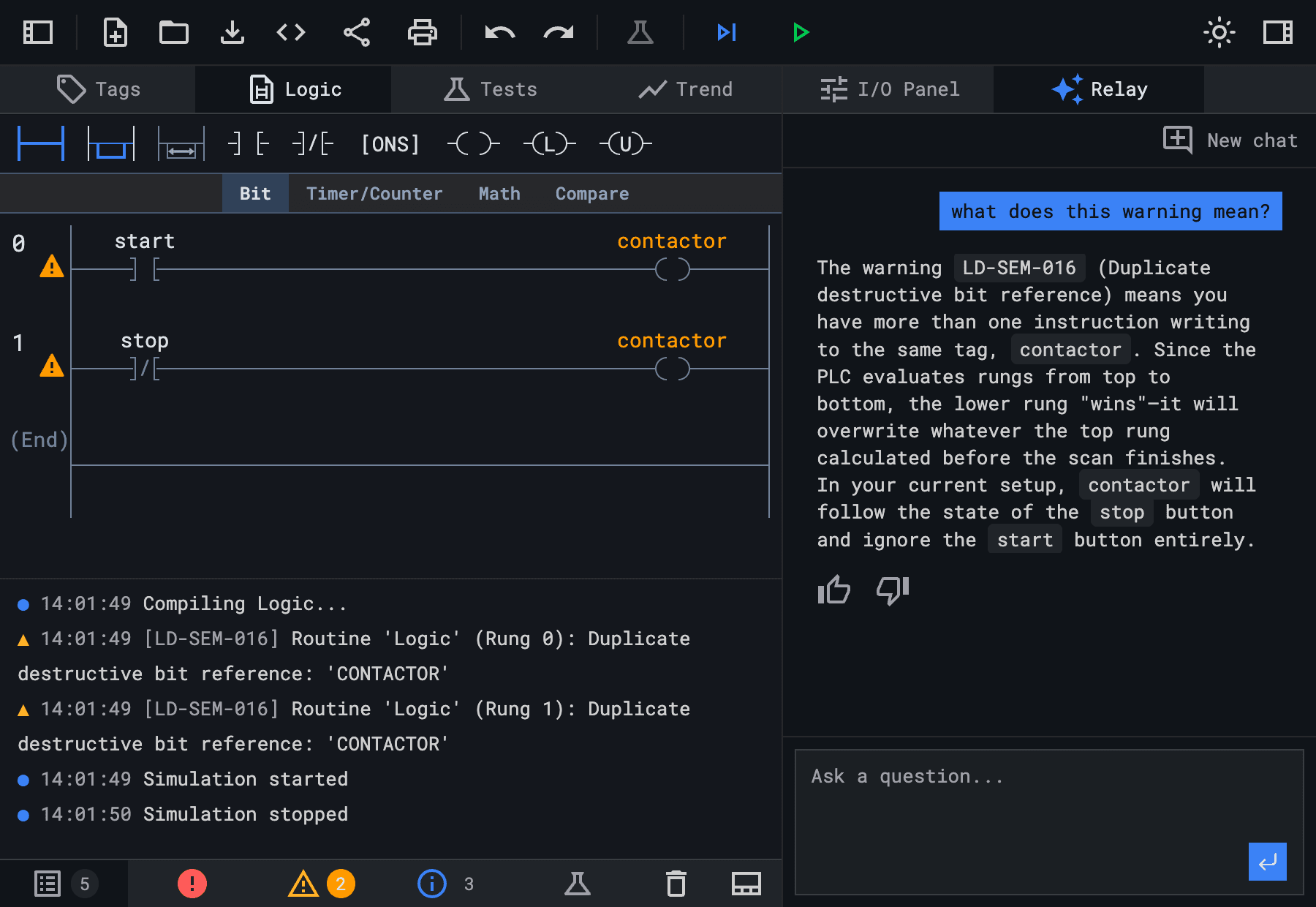
It's reading your actual rungs and the compiler's diagnostic, and translating between them. A general-purpose chatbot can't do that — it doesn't have your code or your warnings.
It knows your IDE
Ask Relay how to fix a missing tag and it answers: "Open the Tag Editor in the right sidebar and add a BOOL named Stop_PB with usage Input." It names the panel, the data type, and the usage. A general-purpose chatbot would say "import a tag into your IDE." Relay knows your IDE.
It also knows where things live in it: OTE is on the Bit tab, TON on the Timer/Counter tab, the Trend tab graphs live tag values during simulation, and the I/O Panel is one click from the Relay panel in the same sidebar. A general-purpose chatbot has to improvise these — and often misses how Studio specifically lays them out.
It teaches design choices, not just syntax
Industrial code rarely has one right answer. A 5-second part-swap delay on a clamping cylinder can gate the Start button entirely, or it can sit on the advance rung and let the operator's hands clear before the cylinder moves. Both work; they're different choices about who's protecting whom.
Relay opens that design space instead of defending one answer.
why did you put the delay timer on Rung 0? shouldn't the machine just start when I press Start?
You can do it either way. Option A: the Start button is literally disabled until the 5-second delay is over. Option B: the machine turns on immediately, but the cylinder waits 5 seconds to advance — that gives the operator time to clear their hands. Most evaluators prefer Option B because it's better for the person using the machine. Which do you want to defend?
It speaks your literal language
Many students using Studio aren't writing in English. Relay answers in whatever language you ask in. The technical mnemonics — XIC, OTE, TON — stay English because those are international, the same on a Rockwell® controller in any country. The explanation — what scan order is, why a double coil bites, when to use a latch — adapts.
como hago un circuito de retención con un contactor y dos luces?
Para hacer un circuito de retención, necesitas que el contactor "se mantenga" encendido después de soltar el botón de inicio. En el editor de ladder, agrega una rama paralela con
XIC(contactor)al lado delXIC(start), y cierra la rama conOTE(contactor)…
Spanish, Portuguese, Italian, Polish, Turkish, German, French. A student in Mexico City doesn't have to translate their question into English to get help, and they don't have to translate the answer back to study from it.
Try Relay during early access
studio.rungs.dev. Browser-based, no install. Click the Relay tab in the right sidebar and type a question — in any language you like.
If you're an instructor, point your students at it and tell me what they get stuck on. If you're a student, ask the dumb question first; Relay would rather hear I don't understand what "normally open" means than answer the wrong question politely.
The editor, simulator, and tests in Studio are free and will stay that way. Relay is free during early access; paid AI features may come later. If you want to try Relay without paying, now is the time.
Rungs Studio 0.7.0
Rungs Studio 0.7.0 release notes — inline tag editing on rungs, expression-based array indexes, Logix-grade arithmetic, and printable Add-On Instructions.
Why Relay reads your PLC logic better than ChatGPT
ChatGPT writes your whole PLC routine if you ask. Relay won't — it reads your live ladder logic and tests in Rungs Studio and teaches one step at a time.